User-pools API
An Amazon Cognito user pool is a user directory for web and mobile app authentication and authorization.
- From the perspective of your app, an Amazon Cognito user pool is an OpenID Connect (OIDC) identity provider (IdP)
- Your app users can sign in either directly through a user pool, or federate through a third-party identity provider (IdP).
- A user pool adds layers of additional features for security, identity federation, app integration, and customization of the user experience.
Verify use’s session are from trusted sources
- Combine Cognito with external identity provider
- With AWS SDK -> choose API authorization model
- Add Lambda func to modify the default behavior of Cognitor
Authentication flow:
- Public authentication: InitiateAuth -> RespondtoAuthChallenge
- Sever-side authentication: AdminInitiateAuth -> AdminRespondToAuthChallenge
Case 1: User pool authentication flow
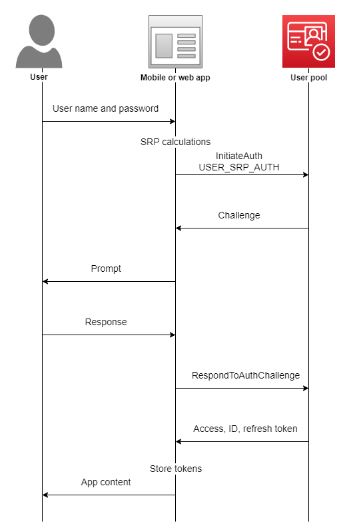
- Your app prompts your user for their username and password.
- You include the username and password as parameters in InitiateAuth.
- Amazon Cognito returns an SMS_MFA challenge and a session identifier.
- Your app prompts your user for the MFA code from their phone.
- You include that code and the session identifier in the RespondToAuthChallenge request.
Case 2:Adding sign-in through a third party
SUMMARY:
Amazon Cognito user pool (OAuth 2.0 IdP) - when sign in as local user to the Amazon Cognito directory without federation through an external IdP
Amazon Cognito user pool (SP) to IdP - social, SAML (Security Assertion Markup Language) or OpenID Connect(OIDC) - user pool acts as a bridge between multiple service provider and your app.
User app <-- Amazon Cognito user pool (SP) <-- IdP=> Your IdPs pass an OIDC ID token or a SAML assertion to Amazon Cognito. Amazon Cognito reads the claims about your user in the token or assertion and maps those claims to a new user profile in your user pool directory
User app -- Amazone Cognito user pool (IdP) with authenticated user profile from external IdP (OIDC and social identity providers, an IdP-operated public userinfo endpoint)=> Amazon Cognito then creates a user profile for your federated user in its own directory. Amazon Cognito adds attributes to your user based on the claims from your IdP and, in the case of OIDC and social identity providers, an IdP-operated public userinfo endpoint. Your user’s attributes change in your user pool when a mapped IdP attribute changes. You can also add more attributes independent of those from the IdP. => After Amazon Cognito creates a profile for your federated user, it changes its function and presents itself as the IdP to your app, which is now the SP. Amazon Cognito is a combination OIDC and OAuth 2.0 IdP. It generates access tokens, ID tokens, and refresh tokens.
Adding social identity providers to a user pool
 Adding SAML providers
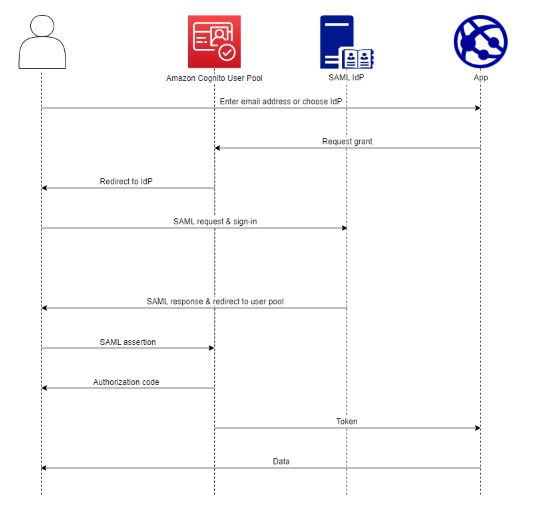 You can choose to have your web and mobile app users sign in through a SAML(Security Assertion Markup Language) identity provider (IdP) like Microsoft Active Directory Federation Services (ADFS), or Shibboleth. You must choose a SAML IdP which supports the SAML 2.0 standard.
With the hosted UI and federation endpoints, Amazon Cognito authenticates local and third-party IdP users and issues JSON web tokens (JWTs). With the tokens that Amazon Cognito issues, you can consolidate multiple identity sources into a universal OpenID Connect (OIDC) standard across all of your apps. Amazon Cognito can process SAML assertions from your third-party providers into that SSO standard. You can create and manage a SAML IdP in the AWS Management Console, through the AWS CLI, or with the Amazon Cognito user pools API. To create your first SAML IdP in the AWS Management Console, see Adding and managing SAML identity providers in a user pool.
Adding OIDC providers
 OIDC is an identity layer on top of OAuth 2.0, which specifies JSON-formatted (JWT) identity tokens that are issued by IdPs to OIDC client apps (relying parties)
- When your user signs in to your application using an OIDC IdP, they pass through the following authentication flow.
- Your user lands on the Amazon Cognito built-in sign-in page, and is offered the option to sign in through an OIDC IdP such as Salesforce.
- Your user is redirected to the authorization endpoint of the OIDC IdP.
- After your user is authenticated, the OIDC IdP redirects to Amazon Cognito with an authorization code.
- Amazon Cognito exchanges the authorization code with the OIDC IdP for an access token.
- Amazon Cognito creates or updates the user account in your user pool.
- Amazon Cognito issues your application bearer tokens, which might include identity, access, and refresh tokens.